Download Monochrome Halftone
Select your platform and follow the installation instructions below.
You're downloading the current release: Version 1.1.
A license for Monochrome Halftone will include this version and the previous ones listed below.
Older releases
Installation Instructions
Windows
- Open your Downloads folder, right-click
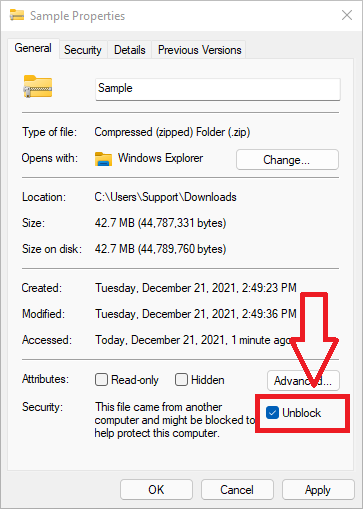
monochrome_halftone_1_1_windows.zip → select Properties → check "Unblock" (see image) → click OK
- Right-click the ZIP again → select "Extract All..."
- Open a new File Explorer window and navigate to:
C:\Program Files\Common Files\OFX\Plugins
- Copy the entire
monochrome_halftone.ofx.bundle folder into this directory. You'll be asked for administrator permission.
- Restart DaVinci Resolve. The effect will be in the OpenFX panel under "Academy VFX"
Adobe After Effects & Premiere
- If you haven't already done steps 1–2 above: right-click the downloaded ZIP → Properties → check "Unblock" → OK, then right-click it again → "Extract All...". (A blocked ZIP is the most common reason the plugin won't load.)
- From the extracted folder, copy
monochrome_halftone.aex into:
C:\Program Files\Adobe\Common\Plug-ins\7.0\MediaCore
You'll be asked for administrator permission.
- Restart After Effects / Premiere. The effect will be in the Effects panel under "Academy VFX"
macOS
- Open your Downloads folder. Safari will auto-extract the zip; for other browsers, double-click
monochrome_halftone_1_1_macos.zip to extract it
- Open a new Finder window, press Cmd+Shift+G and enter:
/Library/OFX/Plugins
- Drag the entire
monochrome_halftone.ofx.bundle folder into this directory. You'll be asked for your password.
- Restart DaVinci Resolve. The effect will be in the OpenFX panel under "Academy VFX"
Adobe After Effects & Premiere
- From the same extracted folder, open a new Finder window, press Cmd+Shift+G and enter:
/Library/Application Support/Adobe/Common/Plug-ins/7.0/MediaCore
- Drag the entire
monochrome_halftone.plugin bundle into this directory. You'll be asked for your password.
- Restart After Effects / Premiere. The effect will be in the Effects panel under "Academy VFX"
Linux
- Open a terminal, navigate to your Downloads folder, and extract:
cd ~/Downloads
unzip monochrome_halftone_1_1_linux.zip
- Copy the bundle to the OFX plugins directory. You'll be asked for your password.
sudo cp -r monochrome_halftone.ofx.bundle /usr/OFX/Plugins/
- Restart DaVinci Resolve. The effect will be in the OpenFX panel under "Academy VFX"
After Installation
- Open your host application (DaVinci Resolve, After Effects, or Premiere) and apply Monochrome Halftone to a clip
- Click the "Start Free Trial" button in the effect controls
- Enter your email and activate your 14-day free trial
- Click "Download License" to complete activation